Showing posts with label bsdowl. Show all posts

Wednesday, 12 August 2015

Opam and BSD Owl Support for Travis CI container-based infrastructure

This article is for users of Travis CI services interested in moving their OCaml, opam or BSD Owl projects to the new container-based infrastructure provided by Travis CI.

Travis, a continuous-integration service, introduced a new container-based infrastructure, promising more speed and reactivity than the old virtual-machine-based infrastructure, which is now deemed deprecated. Users willing to take the move to the new infrastructure are facing a major obstacle: the container-based infrastructure does not support the sudo command, which, in cascade, implies that the Travis users are not able any-more to install packages from random package sources. These dependencies now need to be installed from source until you arrange so that a repository containing these dependencies has been white-listed.
The script anvil_travisci_autoinstall.sh distributed with anvil will ease this operation for OCaml, opam and BSD Owl users!

Setting up Travis

We set up Travis to take advantage of its cache, which is not optional since a compilation matrices involving the three latest OCaml compilers needs about 15 minutes setup. For the purpose of the discussion, we consider the example of mixture, an OCaml library implementing common mixins. Let us walk through its .travis.yml file:
language: c
sudo: false
addons:
  apt:
    sources:
    - avsm
    packages:
    - ocaml
    - opam
    - ocaml-native-compilers
install: sh -ex ./Library/Ancillary/autoinstall bmake bsdowl opam
cache:
  directories:
  - ${HOME}/.local
  - ${HOME}/.opam
script: sh -ex ./Library/Ancillary/travisci
env:
  - TRAVIS_OCAML_VERSION=4.00.1
  - TRAVIS_OCAML_VERSION=4.01.0
  - TRAVIS_OCAML_VERSION=4.02.3
The first declarations, language, sudo and addons constitute the typical prelude of OCaml projects. The script ./Library/Ancillary/autoinstall installs dependencies from sources and initialises opam. The sources are installed to ${HOME}/.local and opam files are stored in ${HOME}/.opam, caching these files allows us to skip completely this step in case of a cache hit. We present the autoinstall script later, but right now we want to take a look at the last lines of .travis.yml: it defines the actual continuous integration script and a build environement matrix.
The continuous integration script is everything but fancy, it setups opam to target the compiler announced by TRAVIS_OCAML_VERSION and runs the traditional autoconf; ./configure; bmake all combo:
INSTALL_PREFIX="${HOME}/.local"
eval $(opam config env)
autoconf
./configure --prefix="${INSTALL_PREFIX}"
bmake -I "${INSTALL_PREFIX}/share/bsdowl" all

The autoinstall script

The script installing dependencies from sources actually delegates the job to anvil_travisci_autoinstall.sh. Theoretically, this script could be bundled in the distribution instead of being downloaded, but doing so eases updates. The autoinstall script is:
: ${local:=${HOME}/.local}
: ${srcdir:=${HOME}/.local/sources}

if [ -f "${local}/.anvil_autoinstall_cached" ]; then exit 0; fi

git clone 'https://github.com/michipili/anvil' "${srcdir}/anvil"
/bin/sh -ex "${srcdir}/anvil/subr/anvil_travisci_autoinstall.sh" "$@"\
    && touch "${local}/.anvil_autoinstall_cached"
When the installation is succeful, it leaves a cookie in the cache, whose existance guards an early exit condition. The autoinstall script supports three arguments, bmake, bsdowl and opam requiring the setup of the corresponding packages. When setting up opam the file .travis.opam is read to find out which compilers and packages need to be installed:
compiler:
  - 4.00.1
  - 4.01.0
  - 4.02.3
repository:
  - ocamlfind
git:
  - https://github.com/michipili/broken.git
The syntax of this file imitates the YaML format used in .travis.yml but it is converted to a tabular format with sed so that imaginative formatting is discouraged. There is two ways to specify a dependant package: either by reffering to a name in the official repository, or directly with a git repository supporting opam pinning.
Thursday, 16 April 2015

Organise collections of LaTeX documents with BSD Owl Scripts

Let us discuss how to handle collections of LaTeX documents with the build system BSD Owl Scripts. In our example we pretend that we are preparing an electronic journal and want to distribute each article of the journal as a separate electronic document.

Organisation on the file-system

We use the following simple organisation at the file-system level:
  1. We prepare a directory holding each issue of our journal, for instance ~/journal.
  2. Each issue of the journal is represented by a subdirectory.
  3. Each article of the journal is represented by a subdirectory of the directory corresponding to the issue it belongs to.
Assume we already have several articles, as demonstrated by the following command output:
% find ./journal -name '*.tex'
./journal/issue-2013-1/01-galdal/article.tex
./journal/issue-2013-1/02-arathlor/article.tex
./journal/issue-2013-2/01-mirmilothor/article.tex
./journal/issue-2013-2/02-eoron/article.tex
./journal/issue-2013-2/03-echalad/article.tex
Names like galdal, arathlor are the names of fictional authors of articles of our journal. Each submission has a directory containing the text article.tex of the article.

Typeset each single article

We rely on BSD Owl Scripts to transform each article in a PDF file. We therefore add a Makefile in each directory corresponding to an article.
% find ./journal -name 'Makefile'
./journal/issue-2013-1/01-galdal/Makefile
./journal/issue-2013-1/02-arathlor/Makefile
./journal/issue-2013-2/01-mirmilothor/Makefile
./journal/issue-2013-2/02-eoron/Makefile
./journal/issue-2013-2/03-echalad/Makefile
Each of these Makefiles can actually be as simple as
DOCUMENT=       article.tex
.include "latex.doc.mk"
These Makefiles can also define file-system locations where TeX will lookup for common assets, define rules to automatically build some tables or figures, or use any of the more advanced techniques described in the documentation. Since we want to keep focus on the organisational features of BSD Owl Scripts we will stick to that minimalistic Makefile.

Bundle the articles together

To orchestrate the preparation of all our articles with BSD Owl Scripts we just need to write additional Makefiles.
./journal/Makefile
./journal/issue-2013-1/Makefile
./journal/issue-2013-2/Makefile
./journal/issue-2013-3/Makefile
Each Makefile basically contains the list of subdirectories where make should descend to actually build, install or clean. Readers fond of design patterns will recognise aggregates implementing a delegate pattern.
The file ./journal/Makefile should contain:
PACKAGE=        journal

SUBDIR=         issue-2013-1
SUBDIR+=        issue-2013-2
SUBDIR+=        issue-2013-3
.include "bps.subdir.mk"
The file ./journal/issue-2013-1/Makefile should contain:
SUBDIR=         01-galdal
SUBDIR+=        02-arathlor
.include "bps.subdir.mk"
The remaining files ./journal/issue-2013-2/Makefile and ./journal/issue-2013-3/Makefile can be similarly prepared. With these settings, the targets all, build, clean, distclean, realclean and install are delegated to Makefiles found in the subdirectories listed by SUBDIR.
The variable SUBDIR_PREFIX can be used to define a customised installation path for each article, so that the Makefile building a document could be
DOCUMENT=       article.tex
DOCDIR=         ${HOME}/publish/journal${SUBDIR_PREFIX}
.include "latex.doc.mk"
With this setting, the document ./journal/issue-2013-1/01-galdal/article.pdf will be installed as ${HOME}/publish/journal/issue-2013-1/01-galdal/article.pdf and so on. It is possible to tweak this in all possible ways to use arbitrary naming schemes for installed articles, like for instance ${HOME}/publish/journal/issue-2013-1/01-galdal.pdf or whatever we fancy.

Declare locations of file assets

We can elaborate on our basic setup to handle the case where our documents share assets, for instance a logo for our journal or some custom LaTeX packages. In BSD Owl Scripts we can use the TEXINPUTS variable to declare one or more such locations. For instance the declaration
TEXINPUTS=      ${HOME}/share/texmf/tex/latex/journal
will arrange so that TeX finds all files in ${HOME}/share/texmf/tex/latex/journal when it needs them. This statement can be added to individual Makefiles responsible for the preparation of an article, or it can be added to ./journal/Makefile.inc. The latter file is read by make every times it processes a Makefile based on BSD Owl Scripts. Adding that declaration to ./journal/Makefile.inc is therfore similar to adding it to each single Makefile in the project.

Saturday, 11 April 2015

Drawing METAPOST pictures with BSD Owl Scripts


METAPOST, a program my John Hobby, is a powerful language for creating technical drawings and it is found in most if not all TeX distributions. While most LaTeX compilation assistants do not pay much attention to METAPOST, it is very well integrated in BSD Owl Scripts so that preparing a LaTeX document containing beautiful METAPOST pictures is achieved by a Makefile as simple as
DOCUMENT=        galley.tex
SRCS+=           figures.mp
.include "latex.doc.mk"
It is also possible to produce pictures for themselves, using a Makefile similar to
DOCUMENT=        figures.mp
MPDEVICE=        eps pdf png svg
.include "mpost.doc.mk"
It will produce EPS, PDF, PNG and SVG versions of the figures.

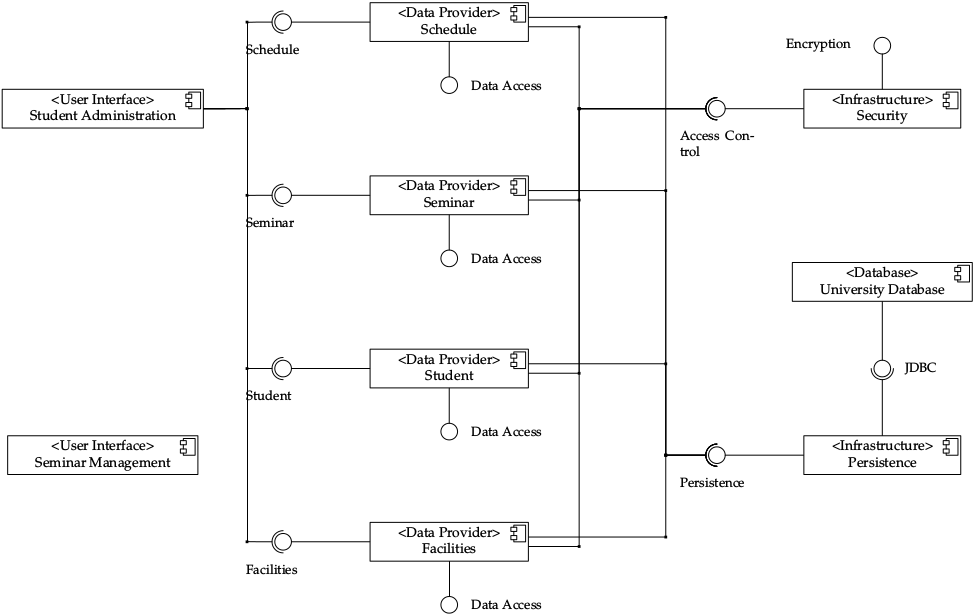
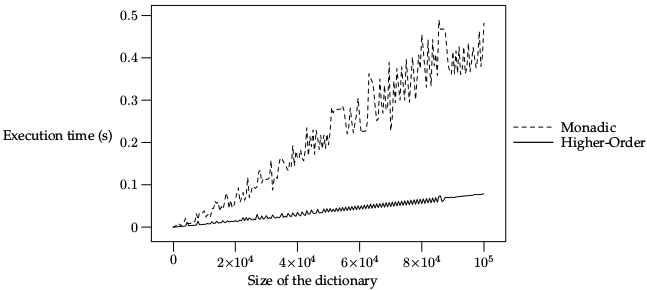
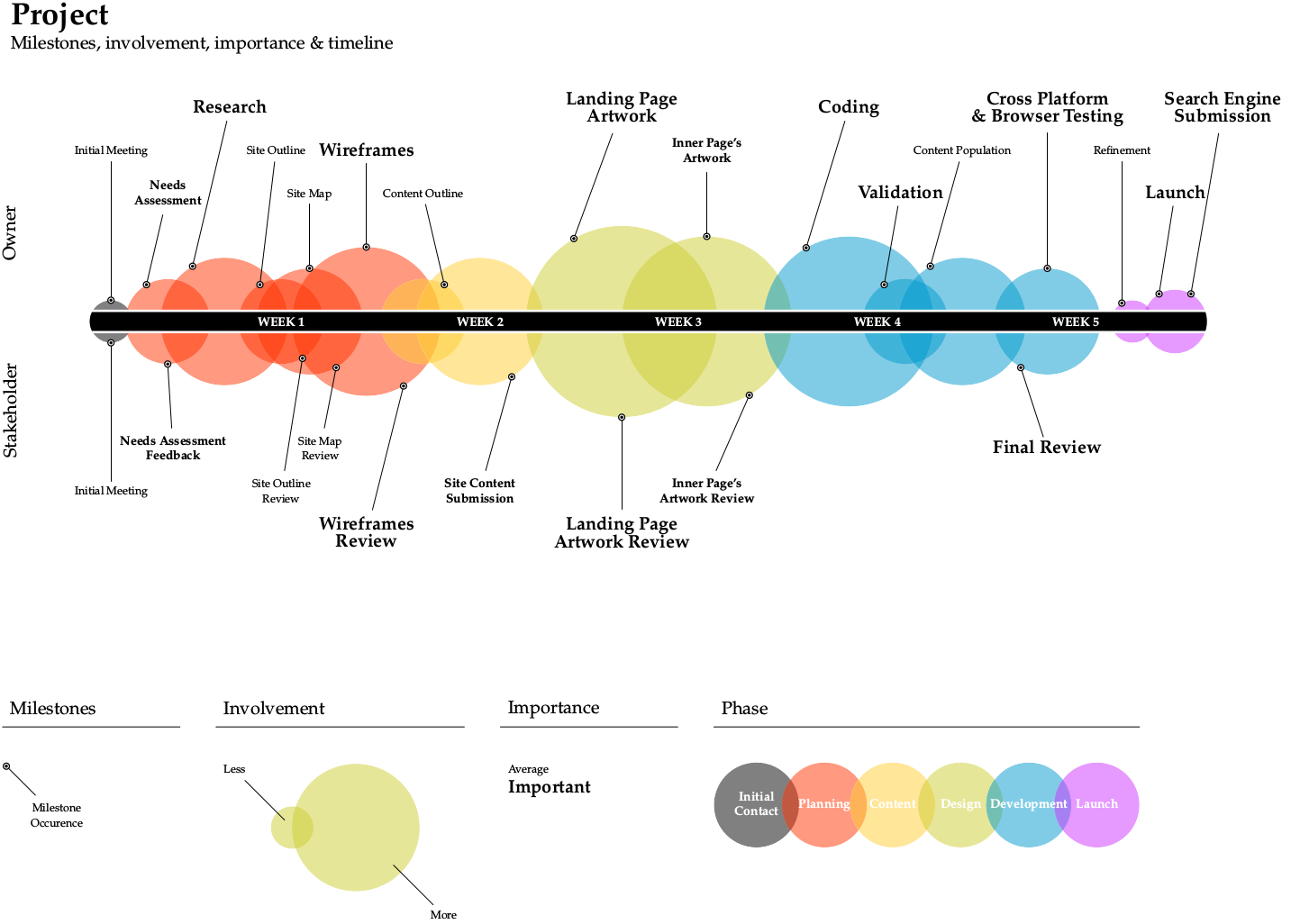
If you do not know METAPOST here are few figures drawn with it:
A performance comparison chart
A timelineA UML diagram
These pictures are examples found in my Blueprint project, a library of METAPOST definitions. This project also illustrates the use of BSD Owl Scripts to produce METAPOST pictures.

See also: Producing LaTeX documents (BSD Owl Scripts documentation), TeX Users Group page dedicated to METAPOST, André Heck's METAPOST tutorial.

Friday, 10 April 2015

Debian and Ubuntu packaging for BSD Owl Scripts users

I recently wrote Debian and Ubuntu packages for anvil, a small software package using BSD Owl Scripts as build system. I documented my work in the form of a short document and of a series of commits in a dedicated branch of the anvil repository.

You can take advantage of this documentation if you want to write Debian or Ubuntu packages for your git-hosted software built with BSD Owl Scripts. Take good note that this documentation is focused on the technical preparation of a package.

If you consider to submit your software for inclusion in Debian repositories, you should get in touch with a mentor which will help you to implement all the best practices desrbied in Debian New Maintainers' Guide.

In contrast, you can to setup a so-called private package archive to let Ubuntu users easily install your package within minutes. Nevertheless, Debian guidelines and processes guarantee the consistency of this distribution, which the publication in private package archives do not.